I built a minimal Pomodoro timer that lives in the macOS menu bar. There are many of these little Pomodoro apps on the internet, but most of them are scammy adware. So I made my own that’s free and designed for one user, me.
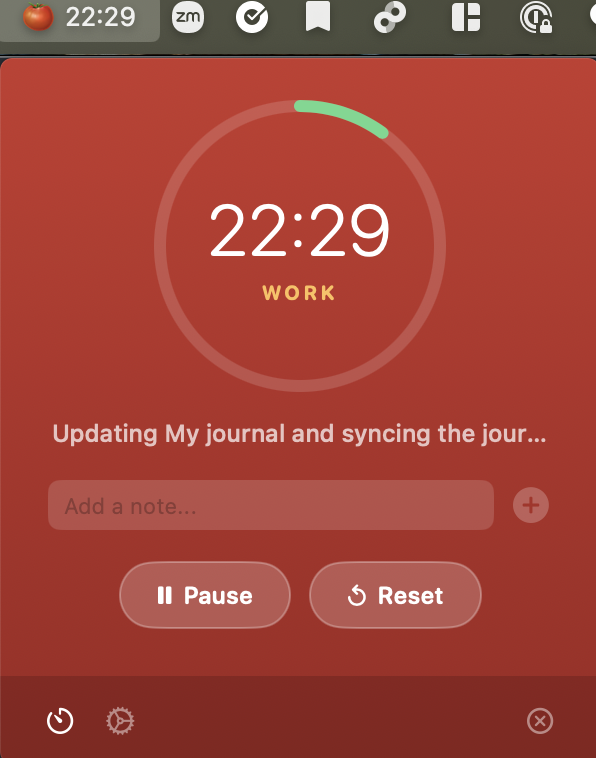
Install
Requires macOS 14+
- Download
Pomodoro-v1.2.zipfrom the latest release - Unzip and drag
Pomodoro.appto/Applications - Since the app isn’t notarized, right-click the app and select Open the first time to bypass Gatekeeper
- To start on login: System Settings > General > Login Items > add Pomodoro.app
Build from Source
If you’d prefer to build it yourself:
brew install xcodegen
xcodegen generate
DEVELOPER_DIR=/Applications/Xcode.app/Contents/Developer xcodebuild \
  -project Pomodoro.xcodeproj \
  -scheme Pomodoro \
  -configuration Release \
  build
cp -r ~/Library/Developer/Xcode/DerivedData/Pomodoro-*/Build/Products/Release/Pomodoro.app /Applications/
Log Format
One of my favorite features is the daily markdown logging. Sessions are stored as one file per day in ~/pomodoro/ (configurable in Settings):
~/pomodoro/
├── 2026-02-17.md
├── 2026-02-18.md
└── 2026-02-19.md
Each file contains all sessions for that day, with full markdown support — so you can paste code blocks, lists, or any structured notes:
## 10:00 — Fix login bug
### Notes
Found the issue in `auth.swift` — token refresh was using the wrong expiry.
Also need to update tests.
### Reflection
Rewrote auth token refresh logic
---
## 11:30 — Write unit tests
### Notes
Covered happy path and token expiry edge case.
### Reflection
Added 12 test cases, all passing
---
Shell Helper
I added this to my ~/.zshrc to quickly query my pomodoro logs:
pomo() {
  case "$1" in
    yesterday) cat ~/pomodoro/$(date -v-1d +%Y-%m-%d).md 2>/dev/null ;;
    search)    grep -ri "$2" ~/pomodoro/ ;;
    *)         cat ~/pomodoro/$(date +%Y-%m-%d).md 2>/dev/null ;;
  esac
}
After running source ~/.zshrc, I can use:
pomo                    # today's sessions
pomo yesterday          # yesterday's sessions
pomo search login       # search all sessions (case-insensitive)
The source code is available on GitHub.